SSRF-to-EC2takeover, Zendesk account takeover and RCE
Description
So in this Blog post i will walk you through some of high severity issues i found in one of the Public Program. This was a company which was providing lots of SAAS applications. During this period I found several issues like IDOR on unauth API,HTMLI and many medium severity issue but I will mostly be talking about some of the interesting issue i found during this period.
Inital Recon
I don’t recon much initally and I will definitely improve my recon soon,even during recon phase i don’t automate stuffs, I don’t use nuclie either most of the time(sometimes running nuclie can really give you fruitful result but i don’t always do), sometimes i also use gauplus to find some url. so, I always start of with subdomain enumeration.First i find some doamin from subfinder then i bruteforce to find some non listed sub-domain using ffuf.
root@x71n0:~$ subfinder -d xxx.com | httpx --status-code
I grep subdomains from here first then I use ffuf to bruteforce some new domains
root@x71n0:~$ ffuf -u https://FUZZ.xxxx.com -w bruteforcelist.txt -ac -mc 200,302,403
sometimes i use this fancy crawling tools like Katana to crawl JS file(I usually look for vulnerable functions or secrets in JS file), I will talk about finding cloud assets when I talk about the Zendesk takeover and I will talk about how i use Shodan when talking about the SSRF.
SSRF to EC2 takeover
Here I will also talk about how i found this IP with shodan and how i proceeded further.
I couldn’t find much stuffs initally so then i went to shodan and used this dork
Ssl.cert.subject.CN:"domain.com" 200
I found several IP,so Initially started with port scan and i confirmed that the IP belongs to org by checking the CNAME records. I saw that APPSMITH was running on 443 with a version released 6 months ago. I recently read blogpost about a ssrf in Appsmith by DNS rebinding CVE-2022-4096, This application was using old version of APPsmith so there was no need of DNS rebinding. So initially i saw the registration was allowed, the url looked like this ( https://192.168.143.12/user/login), i created a account and there was no verification needed. next i clicked on my first app, added data source and clicked on create new API next added this to url and clicekd on run
http://169.254.169.254/latest/meta-data/iam/security-credentials/
this throwed available role
http://169.254.169.254/latest/meta-data/iam/security-credentials/role
this throwed temporary access credential
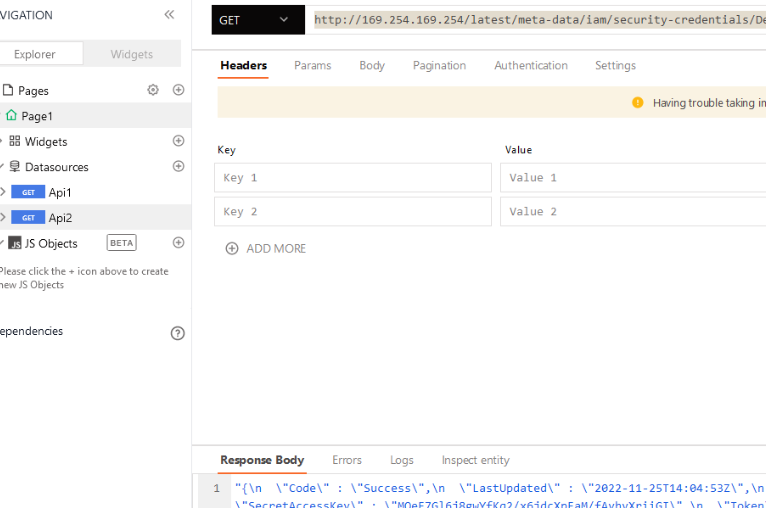
I didn’t try any post exploitations,ofc i didn’t have permission to do or else i would have tried finding some keys in the env variable.
now,lets move to the last part.
Zendesk account takeover due to leaked API key in electron JS based desktop Application
so this is bit intresting, here i will talk how I find cloud assets, I usually bruteforce assets using this cool tool called cloud_enum, this bruteforce with different wordlist to find out misconfigured cloud assets, i usually run this tool with different keywords related to the domain,this works like charm.
root@x71n0:~$ ./cloud_enum.py -k domain -k another-domain
using this i found 2 open s3 buckets
domain-archive.s3..amazonaws.com
domain-devapps.s3.amazonaws.com
the first one just had list permission enabled, it didn’t let me download or read files, the second had lots of electron js appication.There were all the version of the application,from v0.01 to still in development applications. first i tried to check if this application were available to public but i couldn’t find any available desktop application publically so i assumed it was used internally. Next i downloaded the few older version,present version and beta version. I was little bit familiar with electron JS application testing but I didn’t try to find XSS yet but i found out that all version had node-integration set to True with sandbox set to false,so incase i find a xss in future, it can easily be escalated to RCE.
so, after i Downloaded the beta application, I installed the application. It was asking for authentication next I found the app.asar file and unpacked the asar file, you can use the ASAR package from npm to unpack.
asar extract app.asar dir
i found this files after unpacking the beta application, i started reading JS files to find something.

then i found this in the main.js file

I immediately went to read zendesk documentation to see how to use the key and yes this key was still valid,I stopped here. Now lets move to RCE
Finding my first ever RCE with LaTex injection
LaTeX is a document preparation system for high-quality typesetting. It is most often used for medium-to-large technical or scientific documents but it can be used for almost any form of publishing.LaTeX is based on the idea that it is better to leave document design to document designers, and to let authors get on with writing documents. So, in LaTeX you would input this document as:
\documentclass{article}
\title{Cartesian closed categories and the price of eggs}
\author{Jane Doe}
\date{September 1994}
\begin{document}
   \maketitle
   Hello world!
\end{document}

OUTPUT:

    This document is an article.
    Its title is Cartesian closed categories and the price of eggs.
    Its author is Jane Doe.
    It was written in September 1994.
    The document consists of a title followed by the text Hello world!
learn more about LaTex Here So i found a subdomain https://doctex.proc.xxx.com, this application had many feature like managing team,importing CSV file,PPT,DOC,TEX,XLSX.when ever i see XlSX first i always try XXE, so as always i tried but this didn’t work next i had no idea what is this tex file so i tried learning about latex, while reading a blog post on medium i found a article that talks about RCE with latex injection. I started reading about it and i found this repo which had payload of latex injection. The application was providing sample .tex file, i downloaded and this extra payload lines in the end.
\newread\file
\openin\file=/etc/passwd
\read\file to\line
\text{\line}
\closein\file
when i opened the converted pdf file,half of Documents was processed properly but more than half part of the document became white, next i saw payload which was encoding the response to base64
\input|ls|base64
this throwed a huge base64 data in the exported pdf and i decoded the base64 and it had response of my ls command. I tried some other command with base64 encoded and it worked.
After reading about LaTex for sometime i found out that LaTeX does provide powerful programming features, so application should use industry-standard containerization and virtualization technologies to isolate projects from other projects on the same server so this prevent further exploitation of RCE. So, this is the end of Blog post.
Thank you for taking your time to read my Blog, This was it. If you liked the blog,you can follow me on my handles.